
Module: graph
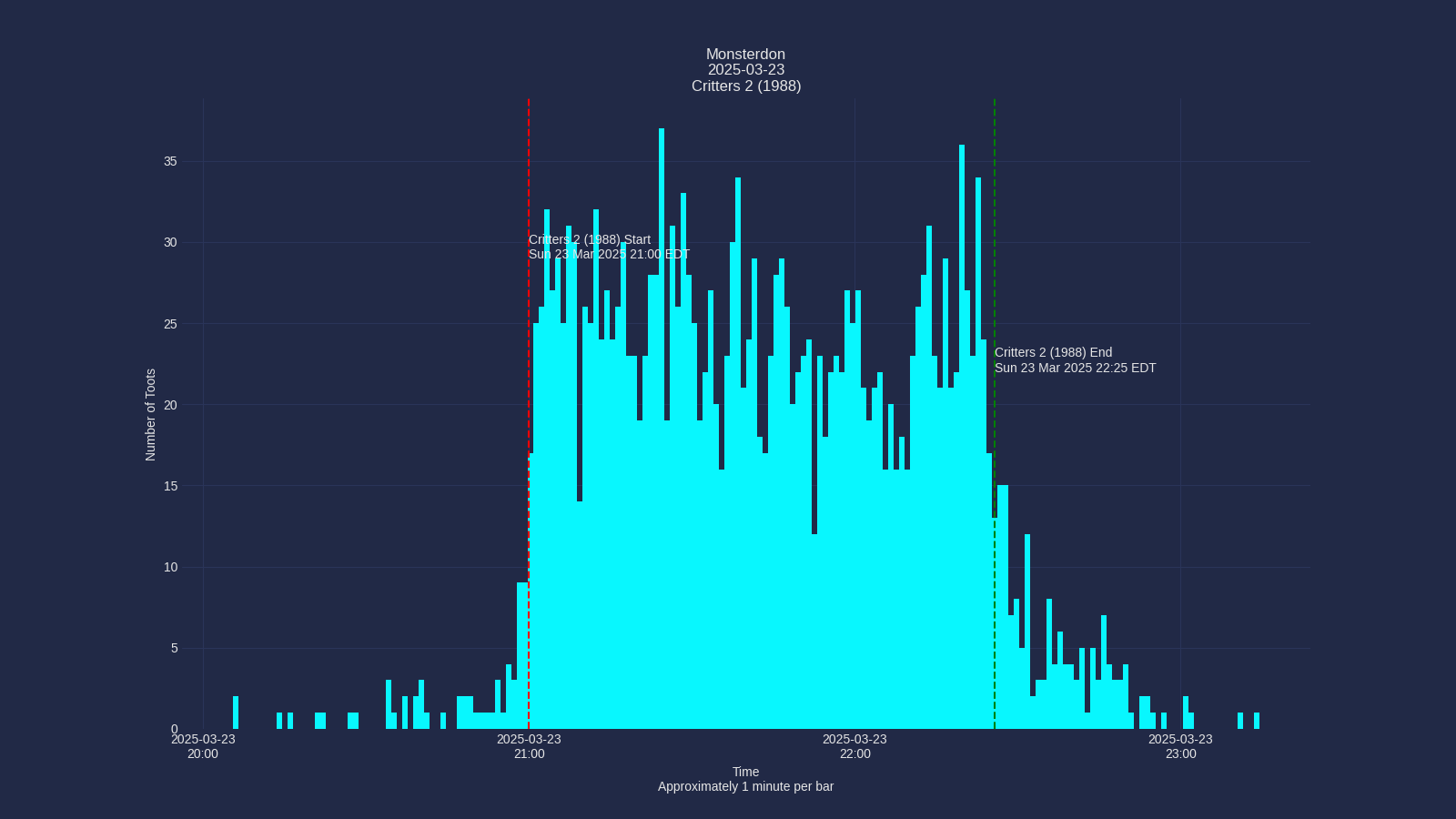
The graph module creates visualizations of toot activity over time. It generates a histogram showing the frequency of toots during the analyzed period, with vertical lines marking the start and end times of the event.
Alt Text Generation
As of version 1.2.0, the graph module now automatically generates descriptive alt text for each graph. This alt text includes:
- The hashtag and date of the analysis
- Duration in minutes between start and end times
- Total number of posts during the event period
- Highest activity (maximum posts in a minute)
- Lowest activity (minimum posts in a minute)
- Average posts per minute
- The graph title
The alt text is saved to a text file with the same name as the graph but with a .txt extension. For example, if the graph is saved as graphs/exampletag-20250409.png, the alt text will be saved as graphs/exampletag-20250409.txt.
Output Files
The graph module produces two files for each analysis:
- PNG Image:
graphs/hashtag-YYYYMMDD.png- The visual representation of toot activity - Alt Text:
graphs/hashtag-YYYYMMDD.txt- Descriptive text summary of the graph
Code Reference
Module to take the data in from analysis and produce graph files.
graph(config)

This is the main function, for now. It invokes get_toots_df()
to get the DataFrame. Then it discards basically everything other than the created_at dates.
It plots a histogram using some jiggery pokery that I adjust manually almost every time.
I'm trying to use cool matplotlib themes that I found here.
Parameters
- config: A ConfigParser object from the config module
Config Parameters Used
| Option | Description |
|---|---|
graph:timezone |
The timezone that all times will be converted to. |
graph:journalfile |
Filename that forms the base of the graph's filename. |
graph:journaldir |
Directory where we will write the graph file |
graph:start_time |
Start time of the event. We draw a vertical line at that time |
graph:end_time |
End time of the event. We draw a vertical line at that time |
graph:start_label |
Label for the start_time vertical line |
graph:end_label |
Label for the end_time vertical line |
graph:graph_title |
Title for the graph |
graph:hours_margin |
Amount of time before/after event to graph |
wordcloud:font_path |
Path to font. Used for title |
mastoscore:hashtag |
Hashtag used for the analysis |
mastoscore:event_year |
Year of the event (YYYY) |
mastoscore:event_month |
Month of the event (MM) |
mastoscore:event_day |
Day of the event (DD) |
Returns
None
Writes the graph out to a file named graphs/hashtag-YYYYMMDD.png Also writes alt text description to graphs/hashtag-YYYYMMDD.txt
Source code in mastoscore/graph.py
def graph(config):
    """
    This is the main function, for now. It invokes [get_toots_df()](module-analyse.md#mastoscore.analyse.get_toots_df)
    to get the DataFrame. Then it discards basically everything other than the `created_at` dates.
    It plots a histogram using some jiggery pokery that I adjust manually almost every time.

    I'm trying to use cool matplotlib themes [that I found here](https://github.com/akasharidas/dark-matplotlib-styles).

    # Parameters
    - **config**: A ConfigParser object from the [config](module-config.md) module

    # Config Parameters Used

    | Option | Description |
    | ------- | ------- |
    | `graph:timezone` | The timezone that all times will be converted to. |
    | `graph:journalfile` | Filename that forms the base of the graph's filename. |
    | `graph:journaldir` | Directory where we will write the graph file |
    | `graph:start_time` | Start time of the event. We draw a vertical line at that time |
    | `graph:end_time` | End time of the event. We draw a vertical line at that time |
    | `graph:start_label` | Label for the start_time vertical line |
    | `graph:end_label` | Label for the end_time vertical line |
    | `graph:graph_title` | Title for the graph |
    | `graph:hours_margin` | Amount of time before/after event to graph |
    | `wordcloud:font_path` | Path to font. Used for title |
    | `mastoscore:hashtag` | Hashtag used for the analysis |
    | `mastoscore:event_year` | Year of the event (YYYY) |
    | `mastoscore:event_month` | Month of the event (MM) |
    | `mastoscore:event_day` | Day of the event (DD) |

    # Returns

    None

    Writes the graph out to a file named graphs/hashtag-YYYYMMDD.png
    Also writes alt text description to graphs/hashtag-YYYYMMDD.txt
    """
    logger = logging.getLogger(__name__)

    timezone = config.get("graph", "timezone")
    debug = config.getint("graph", "debug")
    hours_margin = config.getint("graph", "hours_margin", fallback=1)
    start_time = config.get("graph", "start_time")
    end_time = config.get("graph", "end_time")
    start_label = config.get("graph", "start_label")
    end_label = config.get("graph", "end_label")
    graph_title = config.get("graph", "graph_title")
    font_path = config.get("wordcloud", "font")

    # Get hashtag and date components for filename
    try:
        hashtag = config.get("mastoscore", "hashtag")
        year = config.get("mastoscore", "event_year")
        month = config.get("mastoscore", "event_month")
        day = config.get("mastoscore", "event_day")
        date_str = f"{year}{month}{day}"
    except Exception as e:
        logger.error(f"Failed to get hashtag or date components from config: {e}")
        logger.error("Falling back to journalfile name")
        hashtag = "unknown"
        date_str = datetime.datetime.now().strftime("%Y%m%d")

    logger = logging.getLogger(__name__)
    logging.basicConfig(format="%(levelname)s\t%(message)s")
    logger.setLevel(debug)

    df = get_toots_df(config)

    timedata = df[["created_at"]].sort_values(by=["created_at"])
    # all we care about is time data, so we delete the whole dataframe. :)
    del df
    timedata.insert(1, "id", 1)
    tootdata = timedata.to_numpy()
    timestamps = tootdata[:, 0]
    (oldest, newest) = timestamps[:: len(timestamps) - 1]

    # convert configs to time structures
    start_time = datetime.datetime.fromisoformat(start_time).astimezone(
        tz=pytimezone(timezone)
    )
    end_time = datetime.datetime.fromisoformat(end_time).astimezone(
        tz=pytimezone(timezone)
    )

    # Get font
    title_font = FontProperties(fname=font_path, size=16)
    # set up dates for the graph
    bin_start = (start_time + datetime.timedelta(hours=-hours_margin)).replace(
        second=0, microsecond=0
    )
    bin_end = (end_time + datetime.timedelta(hours=hours_margin)).replace(
        second=0, microsecond=0
    )
    delta = bin_end - bin_start
    dates = [
        bin_start + datetime.timedelta(hours=hours_margin)
        for i in range(int(delta.seconds / 3600) + 1)
    ]
    d1str = datetime.datetime.strftime(newest, "%H:%M on %Y-%m-%d")
    d2str = datetime.datetime.strftime(oldest, "%H:%M on %Y-%m-%d")
    logger.info(
        f"from {d2str} to {d1str} with {int(delta.total_seconds()) / 3600} hours"
    )
    plt.rcParams["timezone"] = "EST5EDT"
    plt.figure(figsize=(16, 9))
    plt.style.use(
        {
            "axes.facecolor": "#1a1a1a",
            "axes.edgecolor": "gray",
            "axes.labelcolor": "white",
            "text.color": "white",
            "xtick.color": "#a0a0f0",
            "ytick.color": "tab:blue",
            "grid.color": "gray",
            "figure.facecolor": "#1a1a1a",
            "figure.edgecolor": "#1a1a1a",
            "savefig.facecolor": "#1a1a1a",
            "savefig.edgecolor": "#1a1a1a",
        }
    )
    plt.title(f"{graph_title}", fontproperties=title_font)
    plt.xlabel("Time\n1 minute per bar", fontsize=16)
    plt.ylabel("Number of Toots", fontsize=16)
    plt.xticks(dates, dates)
    plt.grid(True)
    #  plt.yscale("log")
    ax = plt.subplot()

    # Round the oldest time down to the nearest minute
    bin_start = (start_time + datetime.timedelta(hours=-1)).replace(
        second=0, microsecond=0
    )
    bin_end = (end_time + datetime.timedelta(hours=1)).replace(second=0, microsecond=0)

    # Create minute bins
    total_minutes = int((bin_end - bin_start).total_seconds() / 60)
    minute_bins = [
        bin_start + datetime.timedelta(minutes=i) for i in range(total_minutes + 1)
    ]

    # Count posts per minute
    minute_counts = {}
    for ts in timestamps:
        # Round down to the nearest minute
        minute_key = ts.replace(second=0, microsecond=0)
        if minute_key in minute_counts:
            minute_counts[minute_key] += 1
        else:
            minute_counts[minute_key] = 1

    # Create x and y values for the histogram
    x_values = minute_bins[:-1]  # All but the last bin edge
    y_values = [
        minute_counts.get(x, 0) for x in x_values
    ]  # Get count or 0 if no posts in that minute

    # Plot the histogram
    bars = ax.bar(
        x_values, y_values, width=1 / 1440
    )  # width is 1 minute as fraction of day

    # Calculate and plot 15-minute moving average
    if len(x_values) >= 30:
        # Create moving average data
        ma_window = 15  # 15-minute window
        ma_y_values = []
        ma_x_values = []

        for i in range(ma_window - 1, len(y_values)):
            # Calculate average of the last 15 minutes
            window_avg = sum(y_values[i - (ma_window - 1) : i + 1]) / ma_window
            ma_y_values.append(window_avg)
            ma_x_values.append(x_values[i])

        # Plot the moving average as a yellow line
        ax.plot(
            ma_x_values, ma_y_values, "y", linewidth=2, label="15-min Moving Average"
        )
    else:
        logger.warning(
            f"Not enough data points for 15-minute moving average (need at least 15, got {len(x_values)})"
        )

    event_start = start_time
    event_end = end_time

    # Find highest and lowest points between start and end times
    event_x_values = [x for x in x_values if event_start <= x <= event_end]
    event_y_values = [minute_counts.get(x, 0) for x in event_x_values]

    highest_point = max(event_y_values)
    highest_index = event_y_values.index(highest_point)
    highest_time = event_x_values[highest_index]

    lowest_point = min(event_y_values)
    lowest_index = event_y_values.index(lowest_point)
    lowest_time = event_x_values[lowest_index]

    # Store these for later use
    highest_point_value = highest_point
    highest_point_time = highest_time
    lowest_point_value = lowest_point
    lowest_point_time = lowest_time

    # Calculate relative times from event start
    highest_relative = highest_time - event_start
    highest_minutes = int(highest_relative.total_seconds() // 60)
    highest_seconds = int(highest_relative.total_seconds() % 60)

    lowest_relative = lowest_time - event_start
    lowest_minutes = int(lowest_relative.total_seconds() // 60)
    lowest_seconds = int(lowest_relative.total_seconds() % 60)

    logger.info(
        f"Highest point: {highest_point} posts at {highest_time.strftime('%H:%M:%S')} ({highest_minutes}:{highest_seconds:02d} from start)"
    )
    logger.info(
        f"Lowest point: {lowest_point} posts at {lowest_time.strftime('%H:%M:%S')} ({lowest_minutes}:{lowest_seconds:02d} from start)"
    )

    ymax = max(y_values) if y_values else 0
    xmin = min(x_values) if x_values else oldest
    xmax = max(x_values) if x_values else newest
    label_y = int(ymax * 0.8)

    # Calculate some start and end labels
    start_date_str = datetime.datetime.strftime(event_start, "%H:%M:%S %Z")
    end_date_str = datetime.datetime.strftime(event_end, "%H:%M:%S %Z")
    # Position the start label to the left of the start line with right justification
    # Calculate a small offset to the left of the start line (5 minutes before)
    ax.text(
        event_start - datetime.timedelta(minutes=2),
        label_y,
        f"{start_label}\n{start_date_str}",
        horizontalalignment="right",
    )
    # Position the end label 5 minutes after the end, to look good.
    ax.text(
        event_end + datetime.timedelta(minutes=2),
        label_y,
        f"{end_label}\n{end_date_str}",
    )
    ax.axvline(x=event_start, color="r", ls="--", label="start")
    ax.axvline(x=event_end, color="g", ls="--", label="end")
    ax.xaxis.set_major_locator(mdates.HourLocator(interval=1))
    ax.xaxis.set_major_formatter(mdates.DateFormatter("%H:%M"))
    ax.yaxis.get_major_locator().set_params(integer=True)

    # Graphs go into the journal directory now
    graphs_dir = create_journal_directory(config)
    if not graphs_dir:
        return

    # Create the graph filename with hashtag-YYYYMMDD pattern
    graph_file_name = os.path.join(graphs_dir, f"{hashtag}-{date_str}.png")
    alt_text_file_name = os.path.join(graphs_dir, f"{hashtag}-{date_str}.txt")

    # Generate alt text description
    # Calculate minutes between start and end time
    event_duration = (event_end - event_start).total_seconds() / 60

    # Find data points between start and end time
    event_mask = (timestamps >= event_start) & (timestamps <= event_end)
    event_timestamps = [ts for i, ts in enumerate(timestamps) if event_mask[i]]

    # Use the previously calculated highest and lowest points
    try:
        # Calculate average posts per minute
        avg_posts_per_minute = len(event_timestamps) / max(
            event_duration, 0.001
        )  # Avoid division by zero
        nice_date = datetime.datetime.strftime(event_start, "%A, %e %b %Y")

        # Format the alt text
        alt_text = f"""
A histogram showing posts per minute on {nice_date}. Each bar represents one minute. \
The event was {event_duration:.1f} minutes long. There were {len(event_timestamps)} \
posts during the event with an average of {avg_posts_per_minute:.2f} posts per minute.
"""

        # Add histogram-based statistics using our calculated values
        highest_relative = highest_point_time - event_start
        highest_minutes = int(highest_relative.total_seconds() // 60)
        highest_seconds = int(highest_relative.total_seconds() % 60)

        lowest_relative = lowest_point_time - event_start
        lowest_minutes = int(lowest_relative.total_seconds() // 60)
        lowest_seconds = int(lowest_relative.total_seconds() % 60)

        alt_text += f"""
The busiest moment was at {highest_minutes}:{highest_seconds:02d} from the start \
with {highest_point_value} posts in that minute. The quietest moment was at \
{lowest_minutes}:{lowest_seconds:02d} from the start with {lowest_point_value} \
posts in that minute. The yellow line is a 15-minute moving average."""

    except Exception as e:
        logger.warning(f"Error calculating post statistics for alt text: {e}")
        # Fallback to simpler statistics
        alt_text = f"""
A histogram showing posts per minute on
{datetime.datetime.strftime(event_start, "%A, %e %b %Y")}. Each bar represents \
one minute. There were {len(event_timestamps)} posts during the event. """

    # Save the graph
    try:
        plt.savefig(graph_file_name, format="png")

        # Save the alt text to a file
        with open(alt_text_file_name, "w") as alt_file:
            alt_file.write(alt_text)
            logger.info(f"Saved alt text to {alt_text_file_name}")

    except Exception as e:
        logger.error(f"Failed to save {graph_file_name} and/or {alt_text_file_name}")
        logger.error(e)